
systemrescue_as_a_router
This is an old revision of the document!
System Rescue as a router
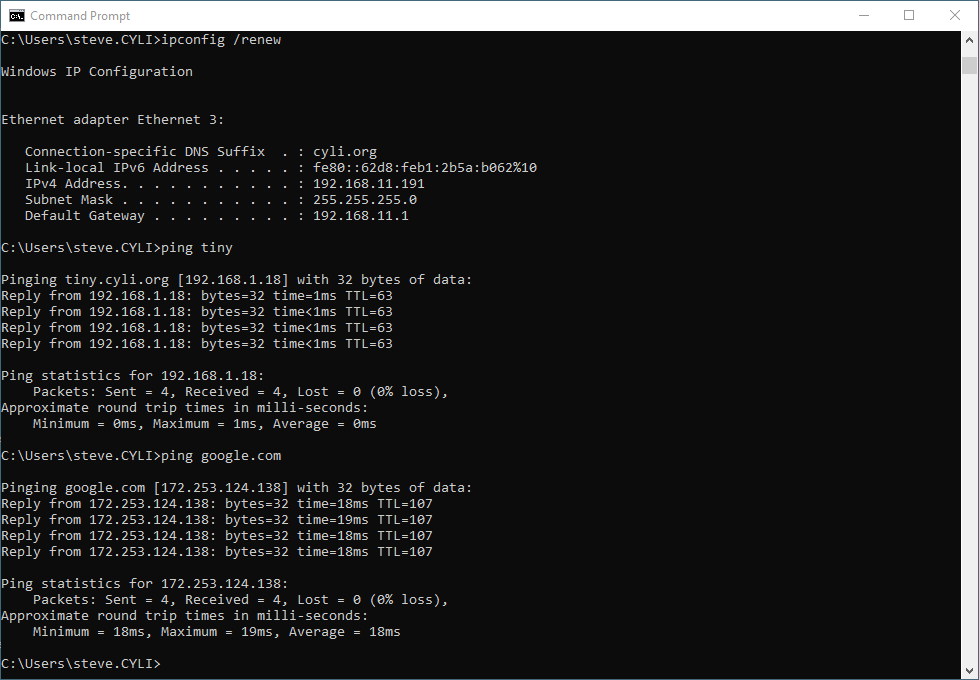
Use curl to get this script to a freshly booted machine running SystemRescue https://www.system-rescue.org/ and use it as an emergency backup router. This was set up in a VM and tested with SystemRescue 12.03.
| curl -sL "https://wiki.cyli.org/doku.php?do=export_code&id=systemrescue_as_a_router&codeblock=0" | bash |
|---|
- srr.sh
#!/usr/bin/env bash
# This sets up pretty much any hardware with two interfaces as an
# emergency router. If it reboots, everything needs to be reloaded.
# If this is booted from Ventoy, add this script in a 3rd partition.

# The variables below are the only things that should need changing;

export ExtIF="enX0"                     # External Interface
export IntIF="enX1"                     # Internal Interface
export Sub="11"                         # Subnet number
export CIDR="/24"                       # Subnet mask
export IntIP="192.168.${Sub}.1"	        # Internal interface address
export IntNet="192.168.${Sub}.0${CIDR}"	# Internal Network
export IntLow="192.168.${Sub}.50"       # Low IP lease
export  IntHi="192.168.${Sub}.199"      # High IP lease
export Dur="1h"                         # Lease duration
export DNS1="8.8.8.8"                   # First DNS server
export DNS2="1.1.1.1"                   # Second DNS server
export Dom="cyli.org"

# 1. Clean Dnsmasq Configuration
#    Replace the contents of your /etc/dnsmasq.conf file with the following

mv /etc/dnsmasq.conf /etc/dnsmasq.orig

cat << EndOfFile > /etc/dnsmasq.conf
# --- NETWORK INTERFACE ---
# Bind only to the internal interface for security
interface=${IntIF}
bind-interfaces

# --- DNS SETTINGS ---
domain-needed
bogus-priv
domain=${Dom}
expand-hosts

# --- UPSTREAM DNS FORWARDERS ---
server=${DNS1}
server=${DNS2}

# --- DHCP SETTINGS ---
# Lease range tailored to your ${IntNet} subnet
dhcp-range=${IntLow},${IntHi},${Dur}

# Explicitly pass this server's internal IP as the gateway
dhcp-option=option:router,${IntIP}

# Announce this server as the authoritative DHCP source
dhcp-authoritative
EndOfFile

# 2. Network Interface Alignment
#    Before starting the services, ensure your internal interface (${IntIF})
ip addr add ${IntIP}${CIDR} dev ${IntIF}
ip link set ${IntIF} up

# 3. Bash Script to Flush Rules, Enable Routing, and NAT
#    Run this script to completely wipe the firewall, enable system-level
#    packet forwarding, and route internal client traffic out to the
#    internet through ${ExtIF}.
#     1. Enable IPv4 packet forwarding in the Linux kernel
sysctl -w net.ipv4.ip_forward=1
echo "net.ipv4.ip_forward=1" | tee -a /etc/sysctl.conf

#     2. Set default policies to ACCEPT everything temporarily
iptables -P INPUT ACCEPT
iptables -P FORWARD ACCEPT
iptables -P OUTPUT ACCEPT

#     3. Flush all rules from all tables (Filter, NAT, Mangle)
iptables -F
iptables -t nat -F
iptables -t mangle -F

#     4. Delete all custom user-defined chains
iptables -X
iptables -t nat -X
iptables -t mangle -X

#     5. Reset all packet and byte counters back to zero
iptables -Z

#     6. Configure NAT / Masquerade out of the external interface
iptables -t nat -A POSTROUTING -o ${ExtIF} -j MASQUERADE

#     7. Forward traffic from internal network out to the internet
iptables -A FORWARD -i ${IntIF} -o ${ExtIF} -j ACCEPT
iptables -A FORWARD -i ${ExtIF} -o ${IntIF} -m state --state RELATED,ESTABLISHED -j ACCEPT


## Restarting the Clean Infrastructure
#  Wipe out any runtime artifacts from old setups and fire up the new router configuration
#  Clear any stuck active leases
rm -f /var/lib/misc/dnsmasq.leases

#  Kill rogue dnsmasq processes
killall dnsmasq 2>/dev/null

#  Restart your freshly configured system service
systemctl restart dnsmasq
systemrescue_as_a_router.1781978396.txt.gz · Last modified: by steve