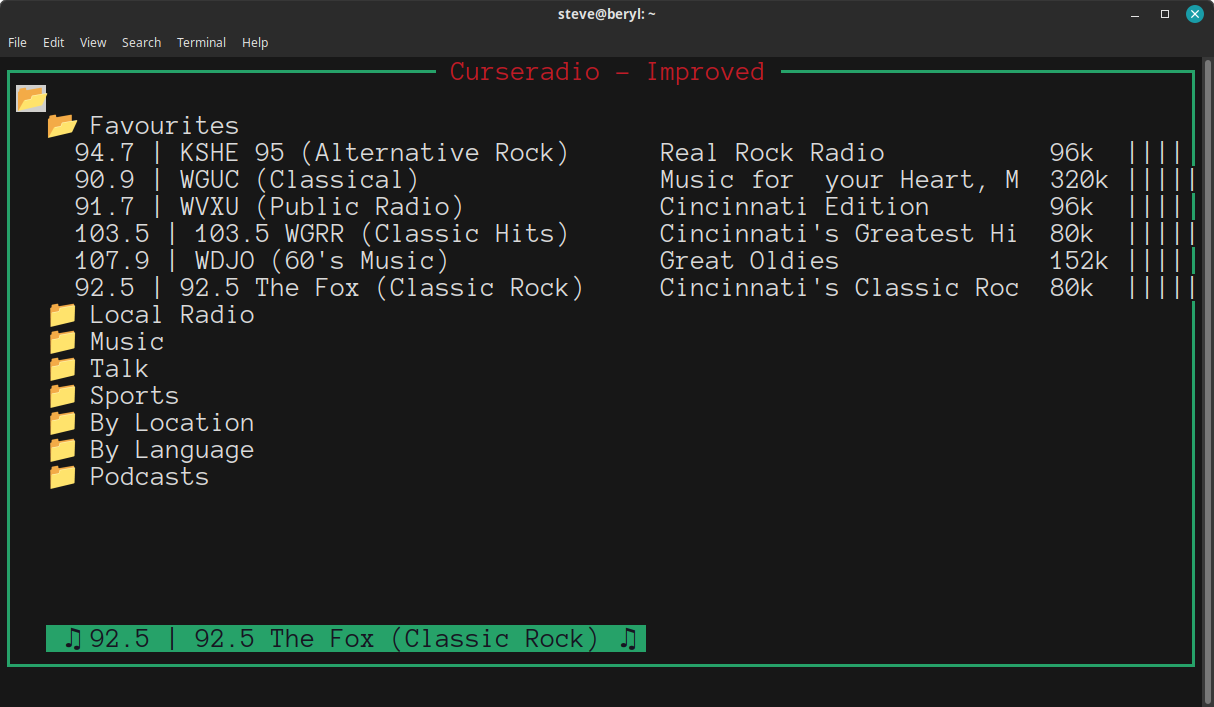
Install curseradio-improved
From; https://github.com/DanielSchuette/curseradio-improved
Curseradio-Improved is a terminal-based internet radio player for Linux that allows users to browse and listen to thousands of online radio stations worldwide.
The program is written in Python and utilizes the popular MPV media player to stream audio. Curseradio features a simple, intuitive interface with a built-in directory of radio stations, making it easy for users to discover new music and radio content directly from the terminal.
To install Curseradio-Improved on Debian, follow the steps below:
First, install the MPV media player by entering the following commands:
sudo apt-get update
sudo apt-get install mpv
Next, install Curseradio using the following commands:
sudo apt-get install python3-pip python3-venv
python3 -m venv ~/.venv
source ~/.venv/bin/activate
pip3 install curseradio-improved lxml requests xdg pyxdg pip-review
pip-review  --local --auto
Curseradio provides a unique and convenient way to explore and listen to internet radio stations from around the world within the Linux terminal. Its simple interface, combined with the powerful MPV media player, makes it a popular choice for users seeking a lightweight, text-based radio player. Compatible with a wide range of Linux distributions, Curseradio is an excellent addition to any Linux user’s terminal toolkit.
A handy addition to this is, after install; Update things every now and again with;
source ~/.venv/bin/activate
pip-review  --local --auto
When you're done using the virtual environment, type
deactivate
and press enter to exit that sub-shell.
Finally, if you want a helper script to start this application, put this in ~/bin/Radio and make it executable with chmod a+x ~/bin/Radio
- Radio
#!/usr/bin/bash
# For reference on the installation, see;
# https://wiki.cyli.org/doku.php?id=install_curseradio-improved
source ~/.venv/bin/activate
curseradio-improved
Then, in a terminal, just run 'Radio'.
The default key commands are;
- 'Up arrow' or 'k' moves up
- 'Down arrow' or 'j' moves down
- 'Home', 'Page up', 'g' or 'p' moves to the top
- 'End, 'Page down', 'G' or 'n' moves to the bottom
- 'Enter' starts playing a stream
- 'f' mark as favorite
- 's' stops playing
- 'q' quits
┌────────────────────────────── Curseradio - Improved ──────────────────────────────┐
│V                                                                                  │
│  > Favourites                                                                     │
│  V Local Radio                                                                    │
│    V FM                                                                           │
│      89.7 | BBN Radio (Religious Music)      Gateway to Joy              40k  ||||│
│      90.9 | WGUC (Classical)                 Elaine Diehl                320k |||||
│      90.9 HD2 | WGUC-HD2 (Jazz)              Jazz on WGUC-HD2            192k |||||
│      91.7 | WVXU (Public Radio)              1A                          320k ||||│
│      92.5 | 92.5 The Fox (Classic Rock)      Cincinnati's Classic Rock   80k  |||||
│      94.1 | Cat Country 94.1 (Country)       Cincinnati's Cat Country 9  80k  |||||
│      94.9 | Mix 94.9 (Adult Hits)            The Mix Morning Show        96k  |||||
│      96.5 | 96 ROCK (Rock)                   Midday                      80k  |||||
│      97.3 | 97.3 The Wolf (Country)          The 90's and more...97.3 T  96k  |||||
│      98.5 | Warm 98 (Adult Hits)             Cincinnati's Hits & Favori  80k  ||||│
│      99.1 | K99.1FM (Country)                New Country K99.1FM         64k  ||||│
│      99.1 HD2 | 95.3 and 101.1 FM The Eagle  Dayton's 80's Station       64k  ||||│
│      101.9 | Q102 (Adult Hits)               Mollie Watson               96k  ||||│
│      103.5 | 103.5 WGRR (Classic Hits)       Cincinnati's Greatest Hits  80k  |||||
│      105.1 | B-105 (Country)                 Grover Collins              96k  ||||│
│    > AM                                                                           │
│    > Internet Only                                                                │
│  > Music                                                                          │
│  > Talk                                                                           │
│  > Sports                                                                         │
└───────────────────────────────────────────────────────────────────────────────────┘
This application uses graphical characters to display some attributes, these can be modified by editing the file found using this command;
source ~/.venv/bin/activate
echo "$(pip3 show curseradio-improved | grep -i 'location' | awk '{ print $2 }')/curseradio_improved/configs.json"
If you replace the command portion in that file with something that captures output, you can get the raw URLs for the audio streams that the python spits out! The 'Console Video Lan Client', cvlc can be used in place of mpv here.