
build_an_alma-9_box_for_development
This is an old revision of the document!
Build an Alma-9 box for Development
This is, of course a VM, in this case under esxi.
- Define a new machine with 8 CPU / 4 GB RAM / 100 GB drive space.
- Initially, set up the network on the Management Network, use BIOS boot, add a few seconds delay.
- Mount the Alma-9 .iso file, and power on the VM
- After the .iso boots, skip the disk check, go into 'Install AlmaLinux 9'
- Don't change anything in the package list, stay with 'Minimal Install'
- For disk partitions, use 'Custom'
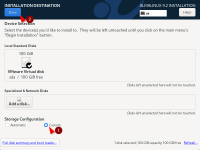
- Click 'Create Default Partitions'
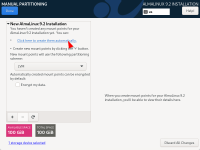
- Remove the 'Home' partition, enlarge 'Swap' to 8 GiB 1), 'Boot' to 2 GiB, and 'Root' to 90 GiB.
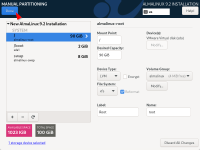
- I try to set volume names of Root, Boot, and Swap.
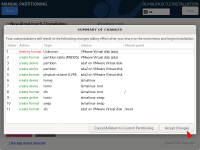
- Click 'Done', in the window that opens, click 'Accept Changes'


1)
Twice whatever RAM is, to a max of 8 GiB, unless there is a specific need otherwise
build_an_alma-9_box_for_development.1688415003.txt.gz · Last modified: by steve